In the last 13+ years, I’ve used nearly every email marketing tool. First for 8 years at an email marketing agency, in my projects with customers. Then I guided over 2,000 senders and brands to find the right software on this site.
As an experienced email marketer, you learn what matters and what doesn’t. You can say we know a lot about email marketing software. Our team has reviewed over 30+ email marketing platforms on this site ourselves.
So we want to share our insights to save you time. And more specifically, help you choose the right email marketing platform.
If you need help, just get in touch, we’re happy to help.
Now, let’s get you set up with the best platform for your needs.
The Best Email Marketing Services
If you are looking for more specific tool recommendations, check out the reviews in specific industries:
- Best CRM with email marketing
- Free and cheap email marketing tools
- Best email marketing tools for ecommerce
- Best email marketing tools for Shopify stores
- Best email marketing tools for affiliate marketers
- Best CRM with marketing automation
- Jump to our industry overview below
5 Best Email Marketing Platforms Overview
I’ve seen email marketing software used in lots of different ways. But most people are looking for an email marketing platform to do the important things in a simple way.
Create attractive HTML emails without code. Automate your campaigns. Segmentation and targeting messages at the right people. All good email marketing services aim to tick these boxes.
But there are also plenty of differences between platforms. The features they include, who they are best for, and what they cost. I’ll explore these differences in detail in individual reviews for each platform. But below is a summary of the 15 services we chose out of the 35 we reviewed.
| Best For | Free Plan/Trial | Starting Price | Score | |
| MailerLite | Starting with email marketing | Yes | $9 |  |
| Brevo | Free email marketing | Yes | $8.08 |  |
| ActiveCampaign | Marketing automation | Yes, 14 days | $15 | |
| beehiiv | Newsletters & monetization | Yes | $43 | |
| Moosend | Small businesses | Yes, 30 days | $7 | |
| HubSpot | All-in-one platform | Yes | $20 | |
| Mailjet | Newsletters & email API | Yes | $17 |  |
| Omnisend | Ecommerce | Yes | $16 | |
| AWeber | Email design | Yes | $12.50 | |
| Kit | Subscriber growth & creators | Yes | $39 |  |
| MailChimp | Yes | $13 | |
|
| Campaigner | Yes, 30 days | $59 | |
|
| GetResponse | Yes | $15 | |
|
| Constant Contact | Yes, 14 days | $12 |  |
|
| Benchmark Email | Yes | $13 | |
What to Look for in an Email Marketing Platform?
I’ve used my fair share of email marketing platforms over a long time. We have tested and reviewed 30+ for this website. That’s given me a lot of experience with both the good and bad of email marketing. But there are always some features I look out for as essentials. Here are my top six:
- Drag-and-drop email editor: You won’t find an email marketing service without a no-code HTML email builder these days. They’re essential for making attractive email designs quickly. So the first thing I judge email marketing software on is how user-friendly the email builder is. Plus, the quality and choice of pre-made templates.
- User-friendly automation: Automation speeds up and simplifies everything to do with triggered email marketing. That can be simple autoresponders and welcome campaigns. Or automating entire customer journeys, including how you nurture and segment leads. Whatever you want to automate, it should be doable. As with creating emails, I always look for visual workflow builders, how intuitive they are to use, and how detailed you can make the automation.
- Landing Pages and Forms: Email marketing doesn’t go anywhere without people to send campaigns to. Growing your email list is key to growing your business. You can use other list-building tools, but most good email marketing software includes lead capture and sign-up forms. And landing pages to host forms on.
- Personalization and Segmentation: Email marketing gets the best results when you target your campaigns and make them personal. Segmentation tools split your contacts up according to contact information and their behaviour. This helps you send timely, relevant content to the right people. And improve engagement and conversions.
- Flexible Pricing: Cost is always a consideration when choosing any platform. The key is getting the features you need at a price you can afford. For me, the best email marketing services start their pricing low and have the flexibility to grow. We look at how many subscribers you get and the email limits. A generous free plan or a full-feature trial is helpful. So you can check a service out without being tied to it.
- Strong Deliverability Rates: Finally, an email marketing campaign only works if your emails get seen. You want as many emails landing in people’s inboxes as possible. High deliverability rates depend on the email service having a good sending infrastructure. But also on you keeping your list clean and reducing bounces. And keep your sender reputation high.
15 Best Email Marketing Platforms in 2026
Now for the best bit. A detailed run-through of the key features, USPs, pros, cons, and prices of all 15 platforms. Based on my experiences using them.
1. MailerLite: Best for starting with email marketing
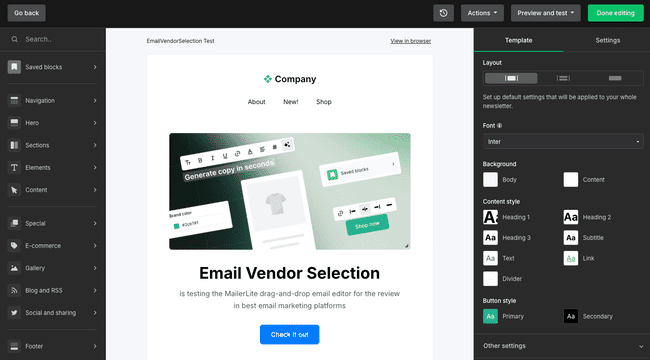
MailerLite is an affordable and user-friendly email marketing platform. It keeps things simple to use and focuses on the email marketing functionality. This makes it ideal for a no-fuss way to build and automate email campaigns. Which is also great for beginners. The free plan is one of the most generous around.
I’m a big fan of MailerLite’s clean, intuitive interface. Everything is easy to navigate. MailerLite’s drag-and-drop email editor makes creating professional-looking marketing campaigns as simple as it can be. It comes with 90+ pre-designed email templates to start.
MailerLite also includes forms, a landing page builder, and a simple website creator.
These are all similarly easy to use.
For its price, MailerLite’s automation tools stand out to me as another major strength. Welcome emails, abandoned cart emails, audience segmentation, and more. You can build some relatively advanced workflows with multiple triggers and actions. The automation editor is simple to use, even for beginners. This is for small to midsize companies, not to build complex enterprise automations.
MailerLite Pros
- User-friendly drag-and-drop email editor
- Very attractive pricing with a generous free plan
- Solid automation features for small businesses
- Landing page, form, and website builder included
- Strong deliverability team compared to competitors
MailerLite Cons
- The interface is only available in 3 languages
- ActiveCampaign and others have more advanced automation
The free plan includes 1,000 subscribers and 12,000 emails per month. MailerLite’s paid plans for email marketing start at just $9 per month. That includes unlimited emails and three account users.
Try MailerLite for free or read our full review
2. Brevo: Best for free email marketing
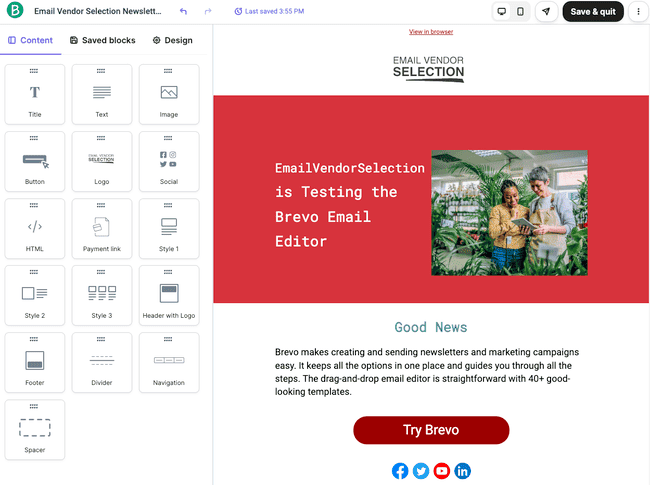
Brevo is an email marketing and CRM platform for small businesses, ecommerce brands, and marketers. Alongside email marketing, it has SMS marketing, CRM, and transactional emails. It suits businesses wanting to manage multiple communication channels in one place. It’s also user-friendly and affordable. Including a fantastic free plan
I’ve always found creating a marketing campaign in Brevo very straightforward. Its drag-and-drop email editor is well-designed and simple to use. But with just 40+ templates to start with, you don’t get much design support. Its marketing automation tools are very impressive. It supports website tracking so you can trigger automated sequences from website visits. And it has 12 pre-built workflow templates. These cover lead nurturing, abandoned carts, personalized follow-ups, and more.
Brevo lets you send multi-channel campaigns including SMS and WhatsApp messages. Businesses can send transactional emails like receipts and order confirmations alongside promotional emails. It also has a sales CRM, so you can track customer interactions across marketing and sales.
What stands out about Brevo is how much you can do for free. The free marketing platform plan includes 100,000 contacts and lets you send 300 emails a day. These can be marketing or transactional emails. You can also include SMS and WhatsApp messages. You can use basic CRM tools for free, too.
Brevo Pros
- Excellent free plan
- Low-cost pricing supports business growth
- User-friendly drag-and-drop email editor
- Strong automation and transactional email capabilities
- SMS marketing, CRM, and live chat tools
Brevo Cons
- Limited email template selection compared to competitors
Paid plans start at just $8.08 per month for 5000 emails. A unique feature of Brevo’s pricing is its very high contact limits. You can have 500,000 contacts even on the cheapest plan. This gives your business plenty of headspace to grow your contact lists for no extra costs.
Get started with Brevo for free or read our full review
3. ActiveCampaign: Best for marketing automation

ActiveCampaign ranks as one of the best marketing automation platforms around. It’s equally well-known for its advanced features and its user-friendly design. It caters to businesses of all sizes. And offers everything from basic email marketing campaigns to sophisticated automation. It also has an impressive CRM.
I find ActiveCampaign amazing for building HTML emails, landing pages, and forms. The drag-and-drop editors are very similar for all three. They are easy to use, and you get a lot of control over designs. There are also an impressive 240+ email templates to choose from. And 60+ landing page templates.
ActiveCampaign comes into its own with more advanced tools. Especially automation. With 900+ workflow templates, it’s hard to think of a sales or marketing process you can’t automate. Triggers and conditions are fully customizable. So you get complete control over what workflows include and how they function. You can link sales and marketing processes together. And use AI-powered predictive analytics to narrow down the best leads and target emails.
ActiveCampaign Pros
- Advanced automations with over 900 workflow templates
- Integrated CRM to align sales and marketing
- AI predictive analytics for advanced targeting
- User-friendly email editor with 240+ templates
- High deliverability rates
ActiveCampaign Cons
- The learning curve for beginners can be a bit steep
ActiveCampaign’s Starter plan costs $15 per month for 1000 contacts and 10,000 emails. There’s a 14-day free trial that lets you send 100 emails to 100 contacts.
Try ActiveCampaign for free or read our full review
Or compare it to other software in our guide to the best ActiveCampaign alternatives.
4. beehiiv: Best for newsletters and monetization

Beehiiv specializes in helping creators and businesses monetize newsletters. In terms of features, there are two sides to the platform. One has everything to do with creating and publishing newsletters. The other is about audience growth and making money.
Beehiiv has a clean, intuitive editor for creating newsletters. It’s a little different from the standard drag-and-drop HTML editors most email marketing platforms have. It leans heavily into text editing tools. Including generative AI features for checking, editing, and making suggestions. These are all great for perfecting your newsletter copy. And making production more efficient.
The monetization features start with list building. With Beehiiv, more subscribers translate into more earning potential. Its choice of lead generation tools stands out from other email marketing platforms. You can build different types of sign-up forms as standard. But it also has the option of one-click Magic Link subscriptions. There’s a referral program that incentivizes subscribers to get their friends to sign up. And you can cross-promote other newsletters to encourage them to do the same with yours.
Recommendations are also one way to monetize your newsletter. You can include paid-for affiliate links to other publications. And get paid for every referral. Beehiiv also runs an ad network. Again, this involves running ads in your newsletter and getting paid per click. And finally, you can also make your newsletter a paid-for subscription. Beehiiv has tools for handling payments.
Pros
- No-code website and newsletter builder
- AI writing tools
- Advanced audience growth tools, including a referral program
- Multiple monetization options
- Advanced analytics and growth dashboards
Cons
- More expensive than many email marketing services
Our pricing starts at $43 a month. You can send unlimited emails and have 100,000 subscribers. There’s a free plan with no monetization features and a cap of 2,500 subscribers.